Botly v2 is here: better quality suggestions, smarter replies, and a big upgrade overall.
Read what's newHow to Use ChatGPT on Tinder: AI Openers and Replies (2026)
Published on May 3, 2025
Read time 1 minute
By Leo
Using AI on Tinder does not mean handing the whole conversation to a robot. In practice it looks small and useful: you open a match, the extension reads what is already on screen, and it offers a reply or an opener you can send as is, tweak, or ignore. The name on the store is ChatGPT for Tinder & Bumble, but under the hood it works with several AI models, not only ChatGPT. This guide covers how to set it up, how to use it well, and where AI still lets you down.
What using AI on Tinder actually looks like
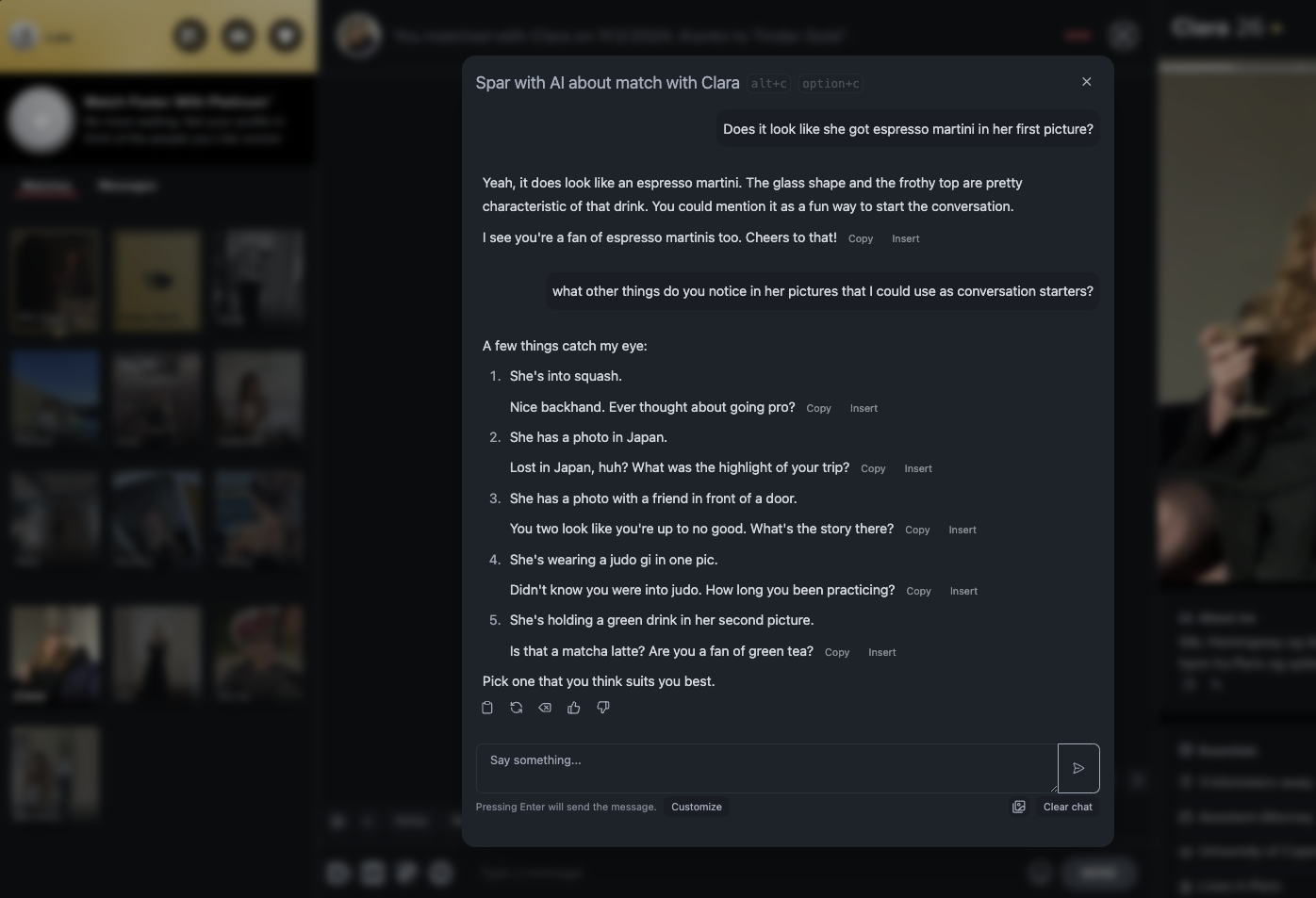
There are two things you will use most. The first is Botly reply suggestions, a small row that shows up inside a match chat and drafts one or two replies based on the conversation so far. The second is the Chat Assistant, a panel you open from the floating toolbar to spar about a match, ask for opener ideas, or think out loud. Both read the chat that is already open in your browser. Neither one sends anything on its own, you always press send yourself.
Set it up in a few minutes
Install the Chrome extension from the Chrome Web Store, pin it, and sign in with your Text App account. That is enough to start. It works out of the box with a built in model, so you do not need to paste any keys to try it.
Open Tinder Web and refresh. A small floating toolbar appears that you can drag anywhere. Open one of your match chats and either click the chat icon in the toolbar or use the shortcut Option + C on Mac and Alt + C on Windows to open the Chat Assistant. Botly reply suggestions show up on their own inside the chat screen once it loads.
[SCREENSHOT: the floating toolbar over Tinder Web with the Botly reply suggestion row inside an open chat]
If you want to choose the exact model instead of the default, open Settings and add an OpenRouter key, either by pasting one or with the one click OpenRouter login. You can then pick from many models, including ChatGPT, Claude, and Gemini, and set one model for Botly replies and another for the Chat Assistant. OpenRouter bills you directly for what you use, so you stay in control of cost. Botly needs a model that supports tools, so keep that filter on when you pick one.
Writing an opener from a profile
The best openers come from something specific in the profile, not a generic line. By default match photos are not sent to the AI, which keeps things fast. If you want openers that react to the pictures, click the image icon at the bottom right of the panel, just before the Clear chat button, and the photos are included on each request.
Ask the Chat Assistant something like “give me two openers based on her bio and photos, one playful and one curious.” You will usually get a couple of options to react to. Treat them as a starting point. The line that mentions the dog in her third photo or the hiking trip in her bio will always beat “hey, how’s your week going.”
Getting unstuck mid conversation
This is where AI earns its place. When a chat stalls and you are staring at a dry “haha yeah,” a suggestion gives you a way back in. You can steer the tone by asking for it. Here are three short examples of the kind of thing you might get.
| Situation | What you ask for | A reply you might get |
| Stalled chat | Something to restart this, light and low pressure | “Okay, important question that decides everything: is a hot dog a sandwich?” |
| She mentioned travel | A follow up that keeps it going | “Lisbon in your photos? I need the real ranking: pastries, views, or the trams?” |
| Moving toward a date | A warm, no pressure way to suggest meeting | “I’m enjoying this. There’s a small coffee place near the park I think you’d like, want to grab one this week?” |
Read every suggestion before you send it. Swap a word so it sounds like you, cut anything that feels too smooth, and skip it entirely if it misses. The goal is a nudge, not a script.
Pro tip. Keep the chat you feed it short, under about ten messages. Shorter context gives the model a clearer read and faster replies.
What AI is good and bad at in dating chats
Being honest about this is the whole point. AI is genuinely good at a few things: unsticking a conversation that died, throwing out first message ideas when your mind is blank, softening a message that came out too blunt, and translating when you and a match do not share a first language. For those it saves real time.
It is bad at the things that actually matter later. It cannot sound like you over weeks of talking, it does not know your history or your humour, and it has no idea about the in person chemistry that decides everything. Lean on it too hard and you build confidence on lines you did not write, which falls apart the moment you meet. Use it to get moving, then take the wheel back.
Related features you might like
- We once ran a hands free voice experiment. Read about it in how we tried Gemini Live on Tinder and Bumble. It is not in the extension right now, but the write up shows where voice assistance can help.
- If you want a message to go out at a specific time rather than a live suggestion, see scheduled replies for Tinder.
FAQ
Is using ChatGPT on Tinder allowed?
There is no rule against getting help writing your own messages, the same way spell check or a friend reading over your shoulder is fine. What matters is that a real person shows up and talks like themselves. Do not use it to pretend to be someone you are not.
Can Tinder detect it?
The extension reads the chat in your browser and drafts text you paste and send yourself. There is no bot logging in and no automation on the account. That said, no tool can promise anything about a platform’s own systems, so keep your messages human and send them yourself.
Is it free?
You can start with the built in model after you sign in, without paying for a key. If you add your own OpenRouter key to pick a specific model, OpenRouter charges you for the usage on that key.
Does it work on Bumble?
Yes. The extension supports Tinder and Bumble on the web. The reply suggestions and Chat Assistant work the same way on both.
Which AI model does it use?
By default it uses a built in model, so it works right after you sign in. Add an OpenRouter key and you can choose from many models, including ChatGPT, Claude, and Gemini, and set a different one for reply suggestions and for the Chat Assistant.