Botly v2 is here: better quality suggestions, smarter replies, and a big upgrade overall.
Read what's newBotly: AI reply suggestions for Tinder
Botly is the AI reply assistant built into the Dating Studio browser extension. It reads your Tinder chat and drafts one or two reply suggestions you can insert, copy, or tweak. You always pick what actually gets sent.
How Botly works
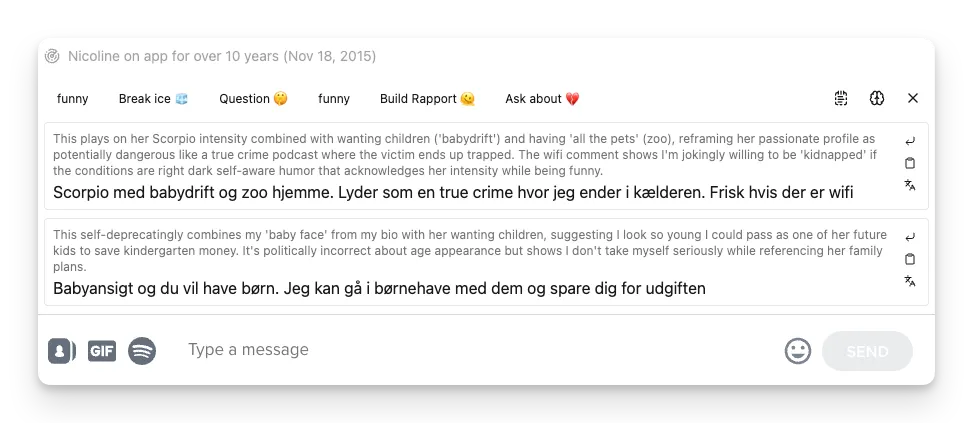
When you open a match in Tinder, Botly appears right in the chat. Ask it for a suggestion and it returns one or two draft replies, each in its own card with a short note explaining the angle it went for. That bit of reasoning is there so you can see why it wrote what it wrote and choose the one that fits your vibe, rather than trusting a black box.
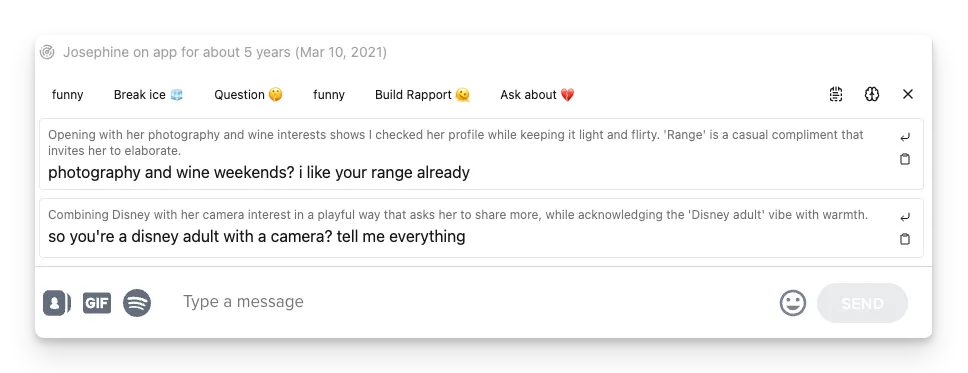
From each card you can Insert the text straight into the message box, Copy it, or hit Translate if the suggestion came back in a different language than your browser. It does not matter whether the last message was yours or theirs. Botly generates suggestions either way, so it works both for keeping a live chat going and for reopening one that went quiet.
Getting Botly
Botly is not a separate app. It ships inside the Dating Studio browser extension, alongside the other chat and profile tools. Install the extension, open Tinder in your browser, and Botly is there in your chats.
Customizing your suggestions
The default prompt gets you started, but Botly is meant to sound like you, not like a generic AI. In the prompt editor you write the system prompt that tells the model who you are, how you text, and when a prompt should run. You can keep several prompts for different situations, such as an opener for a fresh match or a line for a chat that stalled.
The editor is built to be transparent. A System Prompt tab shows your instructions with all the variables filled in, and an API Payload Preview shows exactly what leaves your browser, including your system message and the conversation transcript. There is also a Try Prompt sandbox to test a prompt live before you use it on a real match.
You also choose the model. Use the models the extension provides, such as ChatGPT, Gemini, or Claude, or connect your own OpenRouter API key and pick any model you like. Botly v2 needs a model that supports tool-calling, which most popular models do, and the model browser flags which ones support tools, images, and reasoning. If you would rather not manage a key, the built-in options work out of the box.
Prefer to start from something proven? A toggle lets you keep shared prompts, made by the team or other users, sitting next to your own so you can pick one, duplicate it, and make it yours.
Honest limits
Botly suggests, you decide. It drafts lines from your chat and your prompt, but nothing is sent until you insert it and hit send, and you can always edit first. It is a tool, not a stand-in for you, and it will not magically make a bad match into a good one. AI models also vary, so some suggestions land better than others, which is exactly why you get to see the reasoning and choose. Botly runs on Tinder in your browser today, so it is a desktop-browser companion rather than something inside the phone apps.
Learn more
- Botly v2 is here , a full walkthrough of what changed in the rebuilt version, including the suggestion cards, settings, and inspect panel.
- How to create a Botly prompt as an ice breaker , a step-by-step guide to writing your own prompt and letting the AI reason before it answers.
Try Botly in your chats
Install the Dating Studio extension and Botly shows up in your Tinder conversations.
Add to Chrome