Botly v2 is here: better quality suggestions, smarter replies, and a big upgrade overall.
Read what's newHow to Change Your Location on Tinder (Free and Paid Ways, 2026)
Published on March 24, 2025
Read time 2 minutes
By Leo
There are three common ways people try to change their location on Tinder: Tinder Passport (the official paid feature that lets you set your location to any city), overriding the browser GPS on Tinder Web (a free method our Chrome extension handles), and a VPN (which, as we explain below, does not actually move your Tinder location). This guide walks through each honestly, including what each one can and cannot do.
Tinder Passport: the official paid way
Passport is Tinder’s own feature for changing your location. You drop into any city or place on a map inside the app, and Tinder starts showing you people there instead of around you. Because it is built by Tinder, it is the safest route and will not put your account at risk.
Passport is a paid feature. It is included with the paid tiers (Tinder Plus, Gold, and Platinum), so you need one of those subscriptions to use it. Prices vary by country, age, and current promotions, so we will not quote a single figure here. Check the price shown in your own app before subscribing.
What Passport does not do: it does not hide that you set a location, and matches in a new city can tell you are not local once you start talking. It is meant for travel, so it moves your whole discovery location, not just the distance number.
How to change your Tinder location for free on Tinder Web
If you use Tinder in a browser, there is a free method: change the GPS location your browser reports. Tinder Web reads your location from the browser’s geolocation, so if the browser reports a different spot, Tinder sees that spot. Our Chrome extension does exactly this. It overrides the browser geolocation with coordinates you choose, and nothing else on your computer changes.
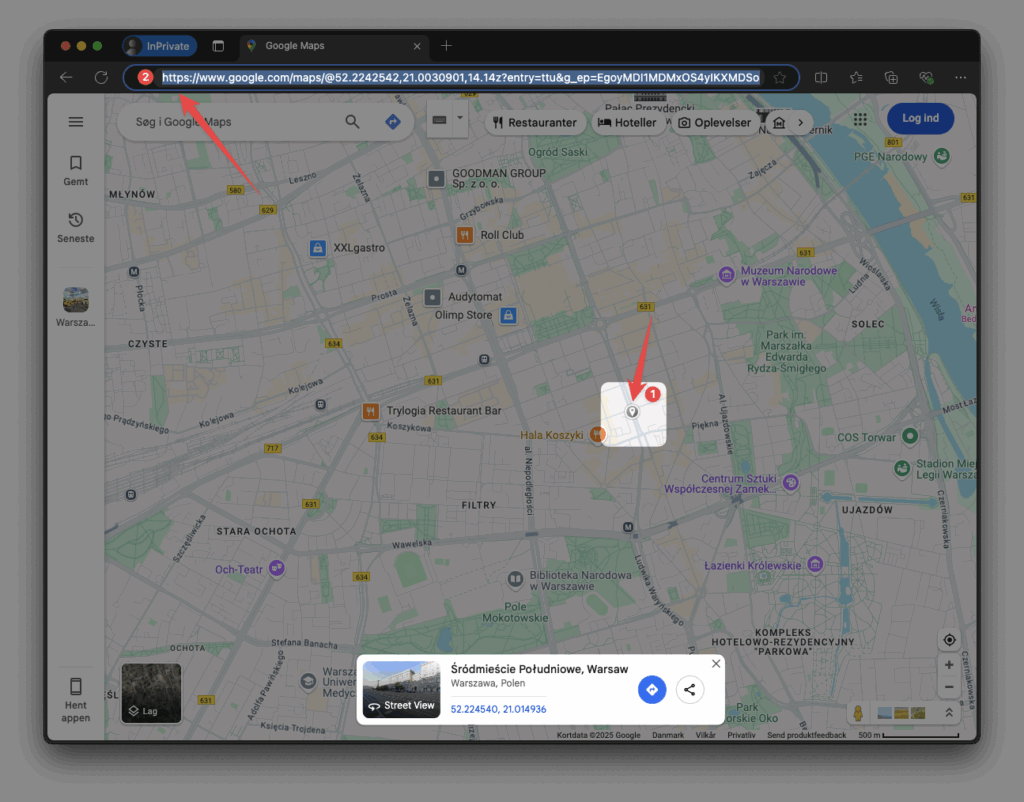
Here is the full flow. First, open Google Maps and click anywhere you want to appear (1). That drops a pin. Then copy the URL from your browser’s address bar (2), which now contains the coordinates.
In your Tinder Web window, find the pin icon in the extension toolbar and open the dialog.

In the dialog, turn on the location feature (1), paste the Google Maps link (2), and click to extract the coordinates (3). Then save (4). If you prefer, you can type the latitude and longitude by hand, or pick one of the random city presets instead of using a link.
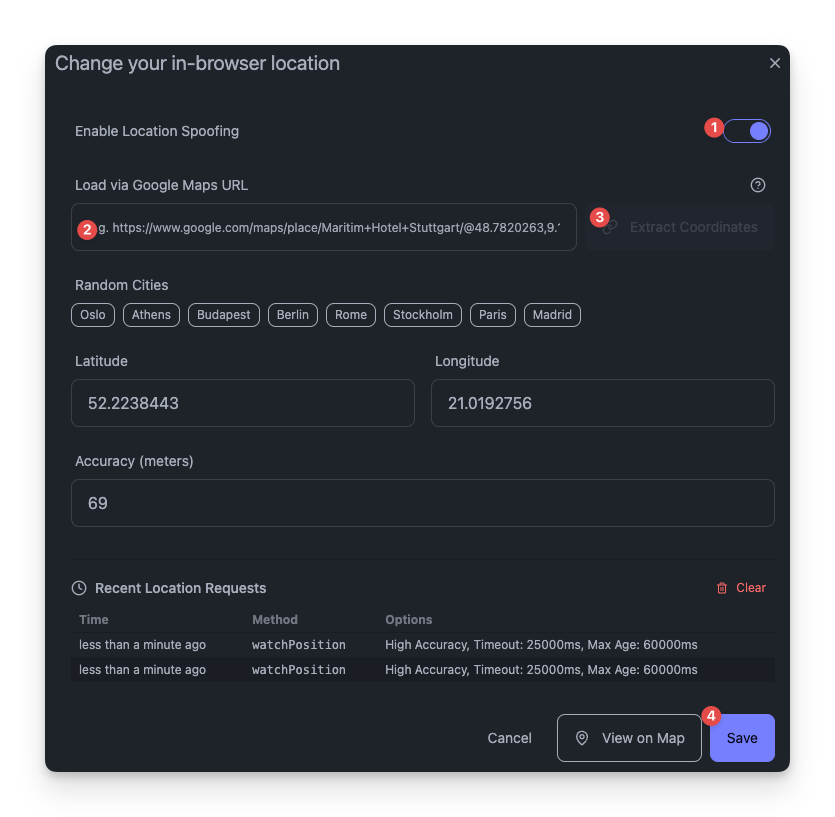
There is also an accuracy field, in meters, that you can leave at the default or adjust. It reflects how precise a real GPS reading would be, and it usually ranges from about 30 meters to a few hundred depending on the device.
Tinder asks the browser for your location roughly once a minute, so the change often shows up within a minute. Be honest with yourself about the limits, though:
- It works on Tinder Web only. The phone app does not read the browser’s location, so this method does not affect the app.
- It changes the GPS location, not your IP address. Tinder may still use other signals, and in some cases that can delay the change. If your location does not update right away, give it up to an hour.
- The distance shown to your matches updates on Tinder’s own schedule, not instantly.
Passport vs browser location vs VPN
| Method | Cost | Works on | Actually moves your Tinder location? |
|---|---|---|---|
| Tinder Passport | Paid (Plus, Gold, or Platinum) | App and web | Yes, official feature |
| Browser GPS override (our extension) | Free | Tinder Web only | Yes, by changing reported GPS |
| VPN | Usually paid | Changes IP everywhere | No, it only changes your IP |
A common misconception is that a VPN changes your Tinder location. It does not. A VPN changes your IP address, but Tinder decides where you are mainly from GPS and device location, not from your IP. So a VPN on its own will not move you to another city on Tinder. That is why the two real options are Passport (paid, official) and the browser GPS method (free, Tinder Web only).
Limits and risks to know
No method guarantees anything, and it is worth being clear about the trade-offs. Passport is an official, sanctioned feature, so using it does not put your account at risk. Changing the browser GPS is a gray area: it is not a Tinder feature, and while people are rarely banned for it, it does bend Tinder’s terms of use, so use your own judgment. Whatever you choose, do not expect a location change to be instant or perfect. Tinder controls when discovery and distances refresh on its side.
The same extension has other tools for Tinder Web, including a way to see how long someone has been on Tinder.
FAQ
Can you change your location on Tinder?
Yes. The official way is Tinder Passport, and on Tinder Web you can also change the GPS location your browser reports, which is free.
How do you change your location on Tinder for free?
On Tinder Web, use a browser GPS override. Our Chrome extension lets you paste a Google Maps link or enter coordinates, and Tinder Web then reads that location. This is free but works only in the browser, not the phone app.
Can you change your Tinder location without Tinder Plus?
Passport needs a paid subscription (Plus, Gold, or Platinum). If you do not have one, the free browser GPS method on Tinder Web is the alternative, with the limits described above.
Does a VPN change your location on Tinder?
No. A VPN changes your IP address, but Tinder reads your location mainly from GPS and device location, so a VPN alone will not move you to another city.
How long does a Tinder location change take?
With the browser method, Tinder asks for your location about once a minute, so it is often quick. In some cases it can take up to an hour, and the distance shown to matches updates on Tinder’s own schedule.