Botly v2 is here: better quality suggestions, smarter replies, and a big upgrade overall.
Read what's newHow to see how long someone has been on Tinder?
Published on May 4, 2025
Read time 2 minutes
By Leo
Ever wondered how long has your match has been on Tinder for, or how it influences your success on the flame dating app. Now you can!
One of the coolest features about using Copilot for Tinder is that it provides this line called X-Ray that reveals various insights. Highlighted with the red border.
It is your answer to Can I see when a Tinder account was created? It shows how long a user has been on Tinder.
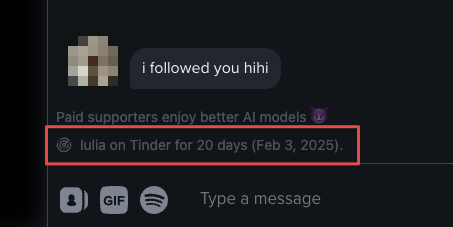
This information has been right in front of our noses however it takes a tiny little mathematical calculation to perform to show this in a pretty way.
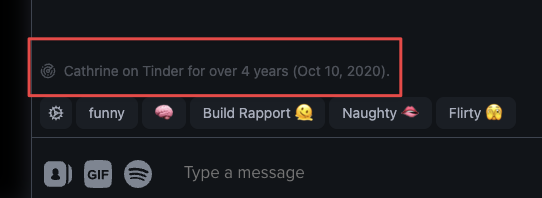
Currently this is available inside the chat view for everyone with the extension installed & logged in. We are working to bring this to the swiping deck too, so you can satisfy the curiosity as you pick between left and right swipes.
Statistics
If you’re curious about the statistical representation of users’ you’ve matched, you can find interesting insights over at the Dashboard → Insights.
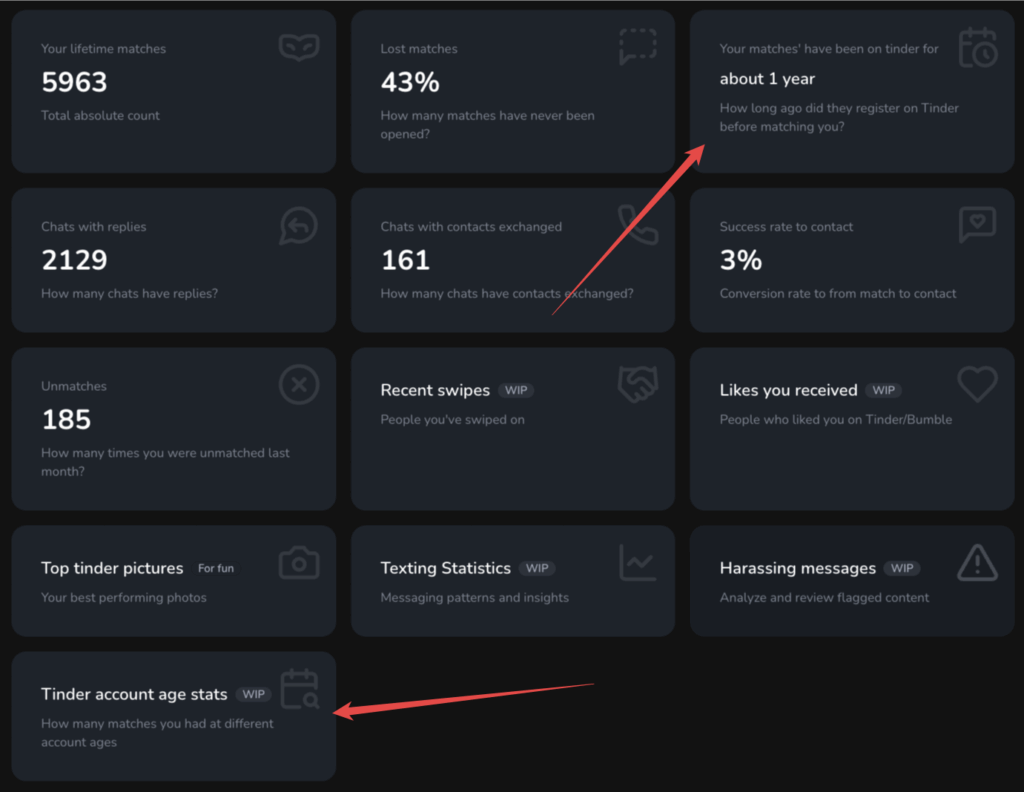
We understand that analytics provided in the right way can be extremely valuable and show one’s strengths.
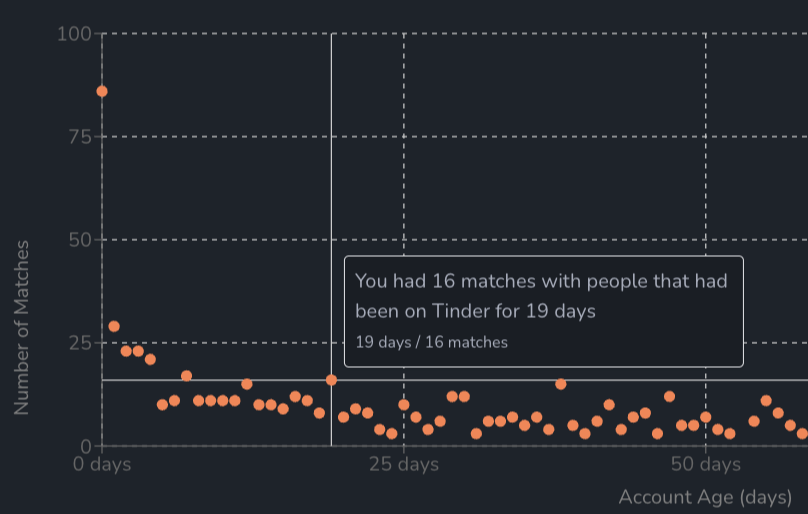
We currently focus our efforts to build the most versatile extension available while backfilling with the creative graphs and insights. If you have a wish or idea for what could be useful for you, please write us either via the feedback form or via email.
When did someone join Tinder? Can you see the join date?
Short answer: Tinder itself does not show a join date or a “member since” field anywhere in the app. There is no official button that tells you when a profile was created.
What we can do is read the timing that Tinder already leaves in the profile data. Every Tinder profile carries an internal ID, and the first part of that ID is a timestamp of when the profile was created. The extension does the small conversion for you and turns it into a plain line like “on app for about 3 months (Mar 9, 2026)”.
So you cannot see an official join date, but you can get a close estimate of when the current profile was created. Keep in mind: if someone deleted their old account and started a fresh one, the estimate reflects the newer profile, not the first time they ever signed up.
How to check when a Tinder account was created (account age)
To check how old a Tinder account is, you need the profile’s creation time, which is baked into the profile ID. Here is the honest version of how it works:
- Tinder assigns each profile an ID when it is created.
- The start of that ID is a timestamp of that moment.
- Convert that timestamp to a date and you have the account’s creation date.
You can do the math by hand, but it is fiddly. With the extension installed and logged in, the account age line appears for you automatically, both on the swipe deck and inside the chat. It works the same way for a match and, if you import your own Tinder data, for your own account too.
This is an estimate built from what Tinder exposes, not a guaranteed official “join date”. It is accurate for the current profile, and that is usually what you care about.
Do Tinder profiles show timestamps? (“Active now”, last active, message times)
This is a common question, so here is what Tinder actually shows and what it does not.
- Tinder shows coarse activity signals, like a green “Recently Active” dot and a “New here” tag on newer profiles. It does not show an exact “last seen at 14:32” time.
- Inside a chat, messages are grouped by date, so you can see roughly when messages were sent.
- Tinder does not show a precise creation timestamp or a running counter of how long someone has been on the app.
The account age line the extension adds is the piece Tinder leaves out: a readable estimate of how long the profile has existed, sitting right next to the profile.
Why account age matters
Knowing roughly how long a profile has been around gives you useful context before you invest time:
- A long-standing account that is active again can mean someone came back to dating after a break.
- A very fresh account is not a red flag by itself, but paired with other signals (few photos, pushy messages, links, or requests to move off the app fast) it is worth a second look.
- It is one signal, not proof. Plenty of genuine people make new accounts, and plenty of old accounts belong to nobody special.
We are honest about the limits: this does not detect bots or scams for you. It only tells you an approximate age so you can decide how much to read into it.
FAQ
Can you see how long someone has been on Tinder?
Not directly in the Tinder app. But you can estimate it from the profile’s creation time, which is stored in the profile ID. The extension shows this as a plain line like “on app for about 3 months”.
Can you see when a Tinder account was created?
There is no official creation date in Tinder. You can get a close estimate from the profile ID, which starts with a timestamp of when the profile was made. That is the number the extension converts into a date for you.
How do you check how old a Tinder account is?
Read the timestamp at the start of the profile ID and convert it to a date. The extension does this automatically once you are logged in, on both the swipe deck and the chat.
Does Tinder notify your contacts when you join?
No. Tinder does not tell your phone contacts, friends, or anyone that you joined. Signing up does not post or message anyone on your behalf.
How do you see timestamps on Tinder?
Tinder shows rough signals rather than exact times: a “Recently Active” dot, a “New here” tag, and messages grouped by date inside a chat. It does not show an exact last-seen time or an account creation timestamp, which is why the extension adds the account age line.
Is there a Tinder timer or age counter?
Tinder has no built-in timer showing how long a profile has existed. The closest thing is the account age estimate the extension calculates from the profile’s creation time.