Botly v2 is here: better quality suggestions, smarter replies, and a big upgrade overall.
Read what's newHow to translate bio and messages on Tinder or Bumble (and Hinge)?
Published on May 4, 2025
Read time 2 minutes
By Leo
Plus you can easily copy, navigate to Instagram page, or just translate. More actions, less clicks.
If you are swiping on your weekend trip to France or moved you another country, it can be pretty frustrating not being able to understand what your potential matches say.
When Chrome extension is installed and you’re logged in, you will see helpful buttons right below the bio on Tinder and Bumble.
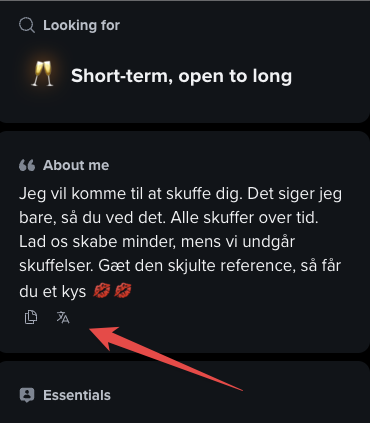
You can either copy and translate via Google Translate, or use our built-in shortcut with the button. Currently the extension attempts to detect when the profile description is not in English and shows the button.
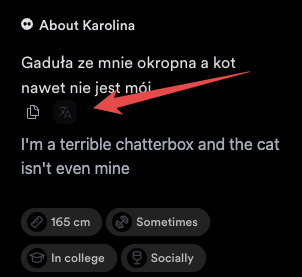
If a bio contains Instagram handle (detect at best effort as-is), you will also see a button to easily open the Instagram profile in a new tab.

Translate a Tinder or Bumble profile to English
To read a bio in English, you have three simple options:
- Copy the bio text and paste it into Google Translate. It auto-detects the language and gives you English.
- Turn on your browser’s built-in page translation on tinder.com or bumble.com to translate everything on the screen at once. In Chrome or Edge, right-click the page and choose Translate, or click the translate icon in the address bar.
- With the Chrome extension installed, use the translate button that appears under a non-English bio, as shown above. It is the fewest clicks.
Does Tinder translate messages?
No. Tinder has no built-in message translation, on the app or on tinder.com. If a match writes to you in another language, Tinder will not translate the chat for you automatically.
The honest workarounds:
- Copy the message and paste it into Google Translate or DeepL in another tab.
- Use your browser’s page translation on tinder.com. It translates the whole page, chat text included, though it can be hit or miss on very short messages.
- The Chrome extension focuses on profile bios, not chat. It does not auto-translate your messages, so for chat the copy-paste or browser method above is the reliable route.
[SCREENSHOT: Chrome right-click menu on tinder.com showing the Translate to English option]
Does Hinge translate profiles or bios?
No. Hinge has no built-in translation, and there is no Hinge web client, so browser page translation and the Chrome extension (which both work on Tinder and Bumble on the web) are not available on Hinge.
On Hinge the only reliable workaround is manual: select the bio or prompt text in the Hinge mobile app, copy it, and paste it into the Google Translate app. It is a couple of extra taps, but it works for any language.
FAQ
Does Tinder have a built-in translator?
No. Neither Tinder nor Bumble ships a built-in translator for bios or messages. You translate with Google Translate, your browser’s page translation, or the Chrome extension’s bio button.
How do I translate a Tinder bio to English?
Copy the bio into Google Translate, or use the translate button the Chrome extension adds under a non-English bio on Tinder and Bumble.
Does Tinder translate messages automatically?
No. Chat messages are not translated automatically. Copy a message into a translator, or use your browser’s page translation on tinder.com.
Can I translate Bumble profiles?
Yes, the same way as Tinder: Google Translate, browser page translation on bumble.com, or the Chrome extension’s bio button.
Does Hinge translate bios?
No. Hinge has no built-in translation and no web app, so copy the text into the Google Translate app on your phone.